ChatGPT vs Claude vs Gemini: Which AI Assistant Should You Actually Use in 2026?
All three have gotten genuinely good, which makes the choice harder, not easier. Here's how they actually differ once you get past the marketing.
A few years ago, choosing an AI assistant mostly came down to which one you'd heard of. That's no longer true — ChatGPT, Claude, and Gemini are all capable enough that the "best" one depends entirely on what you're using it for, not which one has the biggest headlines.
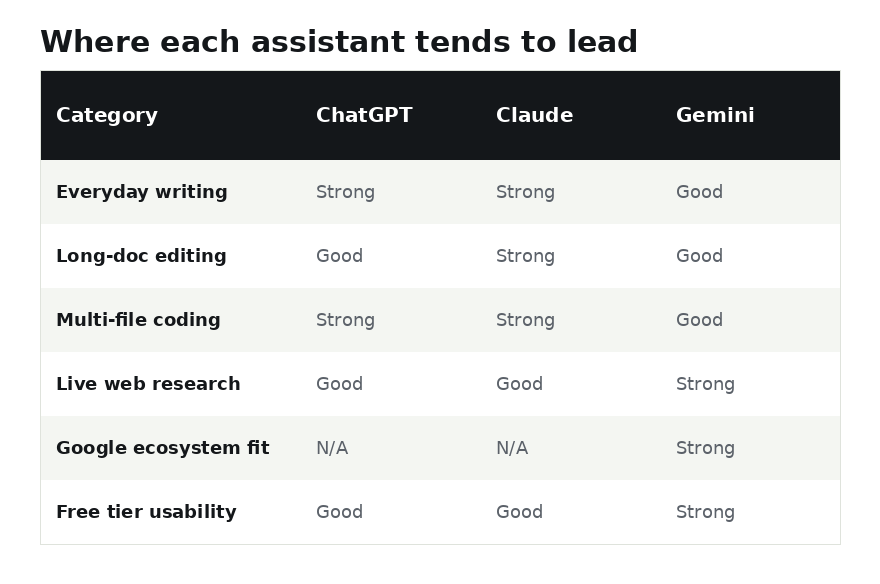
Instead of a single winner, here's how they tend to split by use case — and a few specific, concrete examples of where that split actually shows up in daily work.
Writing and editing
All three can draft a decent first pass at an email, article, or document. Where they tend to differ is tone control: how well the assistant holds onto a specific voice across a long piece of writing, and how much you have to fight it to stop it from sounding generically "AI-written." If you do a lot of long-form writing or editing, it's worth testing each one on a piece of your own past writing and seeing which output you'd have to edit the least.
A concrete test worth running: paste in three paragraphs of something you've already written, in your own voice, and ask each assistant to continue it for two more paragraphs. The one that sounds most like you — not the one that sounds most "impressive" — is usually the better long-term fit for writing work specifically.
Coding
For coding, the meaningful differences show up on larger, multi-file projects rather than short snippets — nearly every current assistant can write a correct function in isolation. What separates them is how well they track context across a whole codebase, how often they introduce subtle bugs in code you didn't ask them to touch, and how well they explain their reasoning when something doesn't work the first time.
Research and fact-checking
This is where built-in web search matters most. An assistant that can search the web and cite sources for a current-events or fast-moving topic is far more trustworthy than one working purely from training data, which can be outdated by the time you're asking. If accurate, verifiable information matters for your use case, prioritize whichever assistant's search and citation feature you find most reliable in your own testing, rather than assuming any one is always right. For dedicated, citation-first research specifically, it's also worth comparing all three against Perplexity, which is built around sourcing in a way none of these three fully replicate.
Ecosystem and integration
If you're already deep in one company's other products — documents, email, or cloud storage — the assistant built into that ecosystem often wins on convenience alone, even if a competitor is slightly stronger on raw capability. Switching costs are real, and a slightly-less-capable assistant that's already logged into your files can be more useful day to day than a better one you have to constantly re-upload documents into. Gemini in particular has leaned hard into this approach recently — see our deeper look at where Gemini now shows up, well beyond its own standalone app.
Pricing
All three offer usable free tiers and a paid tier in a similar price range. If you're using AI daily for work, the paid tier is almost always worth it for the higher usage limits alone — free tiers tend to cap out faster than people expect once AI becomes part of your daily workflow rather than an occasional novelty.
A closer look: three real scenarios
| Scenario | Better fit | Why |
|---|---|---|
| Editing a 20-page document and keeping your exact tone | Claude | Tends to hold voice and nuance over long documents well |
| Researching something that happened this week | Gemini | Strong, tightly integrated live search |
| You already live inside Gmail, Docs, and Drive all day | Gemini | Built directly into tools you already have open |
Our take
There isn't a universal winner, and treating this as a single leaderboard misses the point. A reasonable approach: start with whichever one is free and easiest to try today, use it for two weeks of real tasks — not test questions — and only consider switching if you keep running into a specific limitation that another tool is known to handle better.
Frequently asked questions
Is it worth paying for more than one AI assistant?
For most people, no — one paid subscription used consistently beats three used occasionally. The exception is if your work genuinely splits across very different tasks (say, heavy coding and heavy long-form writing) where different tools have a clear edge in each area.
Do these assistants access the internet for current information?
All three now offer web search as a feature, though it may need to be toggled on and isn't used for every query. For anything time-sensitive, check whether the response is based on a live search or the model's training data.
How often should I re-evaluate which one I'm using?
Roughly every few months. These tools update frequently enough that a comparison from six months ago may no longer reflect current capabilities.