The AI Marketing Tool That Does (Almost) Everything: How It Works and How to Use It
One platform that drafts your blogs, social posts, emails and landing pages. Here is how HubSpot's Breeze AI works, where it stops, and a step-by-step way to use it.
Everyone wants the same thing: a tool that handles all of the marketing so they can get on with running the business. It does not exist in the fully hands-off form. But all-in-one platforms now come closer than any tool did two years ago. The best-known example is HubSpot's Marketing Hub with its Breeze AI, which combines a contact database, content creation, social, email and reporting in one place.
This guide explains what such a platform really does, how the pieces fit together, and exactly how to use one from a blank page to a published campaign. It also covers what it cannot do, because that part decides whether you get good results.
What is HubSpot Breeze?
Breeze is HubSpot's name for the AI built into its platform. It has a few parts: a chat assistant called Breeze Copilot that you can ask for drafts and summaries, and task-specific agents, such as a Content Agent for blogs, landing pages and case studies, and a Social Media Agent for posts. Because it sits on top of HubSpot's CRM, it can use what the system already knows about your contacts and campaigns, which a standalone chatbot cannot.
Availability depends on your plan. Some agents need Marketing Hub or Content Hub Professional or Enterprise, and some features use usage credits. Check HubSpot's current pricing page before you plan around any feature.
How it works: from brief to campaign
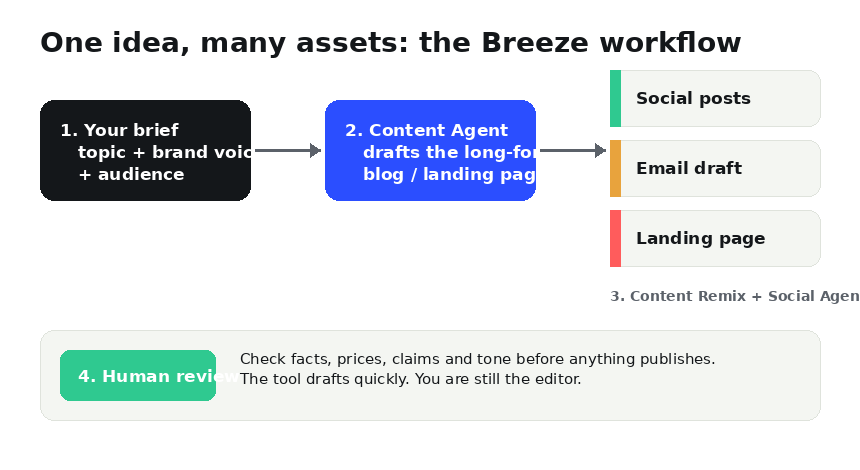
Under the hood, the process is simpler than the marketing makes it sound. You give the system a brief, a language model drafts content, and the platform connects that draft to publishing, email and reporting tools.
What AI marketing platforms can and cannot do
| Marketing job | What the AI handles | What you still do |
|---|---|---|
| Blog and long-form content | First draft from your brief, outline, SEO structure | Fact-check, add real examples, approve |
| Social media | Turns one piece into posts for several networks, drafts captions | Pick what fits your brand voice, schedule, reply to comments |
| Drafts subject lines and body copy from your content | Segment the list, check links, send | |
| Landing pages | Drafts page copy and layout from a brief | Confirm offers, pricing and legal wording |
| Reporting | Summarises what is performing (via Copilot) | Decide what to change next |
| Strategy and budget | Nothing reliable — treat suggestions as prompts | All of it |
The pattern is clear. AI is strongest at producing and reshaping text. It is weakest where judgement is needed: positioning, pricing, who to target, and what to say when a customer is angry.
Step-by-step guide: from blank page to published campaign
These steps follow the workflow in the diagram. Menu names inside HubSpot change as the product updates, so use the labels as a guide rather than a script. The same method works in any similar platform.
Step 1: Write a proper brief (10 minutes)
Before opening any tool, write who the audience is, what they want, what you are offering, and what action you want them to take. Add 3 to 5 keywords. Every output below is only as good as this brief. A vague brief produces generic content; a specific one produces something worth editing.
Step 2: Open the AI assistant and set your brand context
In HubSpot, the Breeze Copilot is the chat assistant inside Marketing Hub. Start by telling it your business, audience and tone in a few sentences. Basic Copilot access has been offered on free accounts, but check what your plan includes.
Step 3: Generate the first draft with the Content Agent
In Marketing Hub, go to the Content area (blogs, landing pages) and choose the AI content option, or ask Copilot to draft it. Paste your brief, pick the content type, and generate. Menu names change as HubSpot updates the product, so follow the on-screen labels.
Step 4: Edit the draft like an editor, not a proofreader
Check every claim, number and name. Replace generic lines with a real example from your business. Add your own opinion. This is the step that makes the post worth ranking and worth reading.
Step 5: Repurpose with Content Remix
Take the finished post and ask the tool to remix it into social posts, an email and a short summary. One piece becomes several, which is where the time saving really comes from.
Step 6: Use the Social Agent for posts
Review the generated social drafts, change the hook of each, and choose a schedule. Do not publish all networks with identical text. Each network reads differently.
Step 7: Build the email
Use the remixed text as the body, write two subject-line options, and send a test to yourself. Check mobile layout and every link.
Step 8: Human review before anything goes live
Run a final checklist: facts verified, brand voice right, no invented quotes or statistics, links working, and legal or pricing wording correct. Then publish.
Step 9: Measure and repeat
After a week or two, look at which posts and emails earned clicks. Feed that back into your next brief. The loop of brief, draft, edit, remix, review, measure is the real system.
Example brief you can copy
Notice what it includes: audience, offer, goal, tone, keywords and the exact outputs. Short briefs lead to generic results.
Alternatives and how they compare
| Tool | Best for | Where it falls short |
|---|---|---|
| HubSpot Marketing Hub + Breeze | One place for CRM, content, social, email and reporting | Best agents sit on paid tiers; can feel heavy for a solo blogger |
| Jasper | Brand-voice copy at volume (ads, blogs, emails) | Writes content, but is not a full marketing system or CRM |
| ChatGPT / Claude / Gemini | Flexible drafting, brainstorming and analysis | No built-in publishing, scheduling or contact database |
| Canva (Magic tools) | Social graphics and simple designs | Visuals only, not campaign management |
If you are just starting, you do not need a platform. A free assistant plus the brief method above covers most of the work. Our best AI productivity tools list and the ChatGPT vs Claude vs Gemini comparison can help you pick one, and writing better prompts will improve every draft you generate.
Who should use an all-in-one platform
It makes sense if you already run marketing across several channels, keep customer data in one system, and lose time moving content between tools. It is overkill if you publish one blog post a week and send a monthly newsletter. In that case, the cost and setup time will not pay back.
Risks to manage
Three things go wrong most often. First, invented facts: AI will state statistics and quotes confidently that are not real, so verify every one. Second, sameness: if everyone uses the same prompts, content blurs together, and your own examples are what set you apart. Third, over-automation: publishing without review is how brands end up with embarrassing posts. Keep a human sign-off step, as covered in our look at AI agents that act on your behalf.
Frequently asked questions
Is there one AI tool that does all marketing?
No. Platforms like HubSpot cover many parts (content, social, email, CRM, reporting), but strategy, brand judgement and final approval still need a person. Be wary of any tool that claims otherwise.
Is HubSpot Breeze free?
Some basic assistant features have been available on free plans, while the content and social agents sit on paid Marketing Hub or Content Hub tiers and may use credits. Pricing changes often, so check HubSpot's current pricing page before you commit.
Can AI-written marketing content hurt my Google rankings?
Google has said it judges content by quality and helpfulness rather than by how it was produced. Unedited, generic AI text is the real risk. Edited content with original examples is fine.
What is the cheapest way to start?
Use a free general assistant (ChatGPT, Claude or Gemini) with the brief method in this guide, then move to a platform only when the manual workflow becomes the bottleneck.