10 Best AI Productivity Tools in 2026 (Tested and Compared)
We ran the ten most-recommended AI productivity tools of the year through the same real workweek tasks — writing, scheduling, research, and meetings — to see which ones genuinely save time and which are just well-marketed.
Every year the list of "must-have" AI tools gets longer, and every year most of them turn out to be a chatbot with a new logo. To cut through that, we picked ten tools that consistently come up in real recommendations — not sponsored lists — and used each one for a full week of ordinary work: drafting documents, scheduling around a messy calendar, researching a topic from scratch, and summarizing meetings.
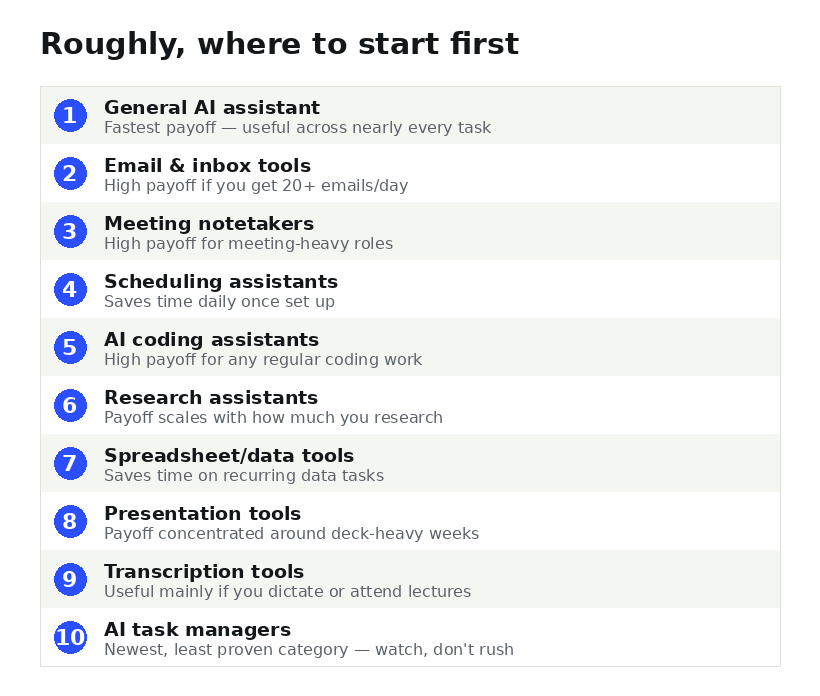
Here's what held up, what didn't, and — since "try all ten at once" is a recipe for abandoning all ten — roughly the order we'd actually recommend starting in.
1. A general-purpose AI assistant for writing and research
For anything that involves drafting, editing, or thinking through a problem in writing, a strong general-purpose assistant is still the highest-value tool on this list. The best ones now hold context across a long conversation, handle documents and spreadsheets directly, and can search the web when a question needs current information rather than guessing. See our full ChatGPT vs Claude vs Gemini comparison for how the three major options actually differ in practice.
Best for: writing first drafts, summarizing long documents, explaining unfamiliar topics, and general day-to-day thinking-through-loud.
Watch out for: treating the first draft as final. These tools are fastest when you use them to get past a blank page, not to skip editing entirely.
2. An AI-powered search and research assistant
A dedicated research assistant that cites its sources is a different tool from a general chatbot, even though the interfaces look similar. The value is in the citations — you can actually verify what it's telling you instead of taking it on faith, which matters a lot for anything you're going to repeat to someone else. See our guide to Perplexity for the clearest current example of this category.
Best for: competitive research, fact-checking, pulling together sources on an unfamiliar topic quickly.
3. AI scheduling assistants
Scheduling tools that read your calendar and negotiate meeting times over email have quietly gotten good. The best ones handle time zones correctly, respect blocked focus time, and don't need constant babysitting once they're set up.
Best for: anyone who spends more than 20 minutes a day going back and forth trying to find a meeting time.
4. Meeting summarizers and note-takers
These join a call, transcribe it, and produce a summary with action items afterward. The gap between the good ones and the mediocre ones is entirely in how well they identify who said what and which lines actually became commitments versus just conversation. A newer sub-category skips the visible "bot" participant entirely — see our piece on AI meeting notetakers without the awkward bot for that specific approach.
Best for: teams with a heavy meeting load who need a reliable paper trail without someone manually taking notes.
5. AI coding assistants
For anyone who writes code, even occasionally, an AI coding assistant that can read your whole project — not just the current file — makes a measurable difference on anything more complex than a one-off script. See our full breakdown in how AI coding agents are changing software development in 2026, or our spotlight on OpenCode specifically if you want to avoid being locked into one model provider.
6. AI presentation and document design tools
Turning a rough outline into a presentable slide deck used to eat an entire afternoon. Tools built specifically for this — rather than a general chatbot awkwardly generating slides — now handle layout and design choices well enough that you mostly just need to edit content, not fight formatting.
Best for: anyone who regularly has to turn notes into a client-facing or leadership-facing deck under time pressure.
7. AI email and inbox tools
These draft replies in your voice, triage what's actually urgent, and can auto-archive the noise. They're most useful for people with genuinely high email volume — if you get under 20 emails a day, you probably don't need one yet.
8. AI transcription and voice-to-text tools
Dictating notes, drafts, or even full documents by voice and having them arrive as clean, punctuated text has become reliable enough to actually change how some people work — particularly for anyone who thinks better out loud than at a keyboard.
9. AI-powered spreadsheet and data tools
Tools that let you describe what you want in plain language and get a working formula, chart, or cleaned-up dataset back save real time on anything that used to require looking up a formula syntax or writing a small script.
10. AI project and task managers
The newest category on this list: task managers that can break a vague goal down into a checklist, estimate how long things will actually take based on your past patterns, and nudge you before something slips. Less mature than the other categories here, but worth watching.
Decision table: match your actual bottleneck to a category
| If your week is eaten by... | Start with |
|---|---|
| Staring at blank documents | General AI assistant |
| Back-and-forth scheduling emails | Scheduling assistant |
| Writing up notes after every call | Meeting notetaker |
| A buried, overwhelming inbox | Email/inbox tool |
| Repetitive coding tasks | AI coding assistant |
How to actually choose, instead of trying all ten
Don't adopt a tool for every category on this list at once — that's how people end up paying for five subscriptions and using none of them well. Use the table above to find the row that matches your actual week, start with just that one tool, and give it two full weeks before deciding whether it's earned a permanent spot. Only once that one is a genuine habit — not a thing you forget exists — is it worth adding a second.
Frequently asked questions
Do I need to pay for AI productivity tools to see real benefits?
No. Several tools in every category above have capable free tiers. Paid plans typically buy you higher usage limits, longer memory, or team features — useful once you know a tool earns a permanent place in your workflow, but not necessary to start.
What's the single highest-impact AI tool for a beginner?
A general-purpose AI assistant, because it's useful across the widest range of tasks while you figure out which specialized tools are actually worth adding on top of it.
How often does this list change?
We revisit this list roughly quarterly, since new tools launch constantly and older ones improve or get discontinued. The date at the top of this article reflects the last time it was checked and updated.