Runway vs Kling AI: Which AI Video Generator Should You Use in 2026?
AI video generation has gone from novelty to a real part of creative workflows this year, and two names dominate almost every conversation about it. Here's how Runway and Kling AI actually differ, beyond the marketing.
Runway and Kling AI have taken different paths to the top of the AI video generation space. Runway has been building generative video tools since 2018 — a pioneer in the category, now positioned as a fuller creative suite. Kling, built by Kuaishou (the company behind a major short-video platform), arrived more recently but has grown fast by pairing strong output quality with notably more accessible pricing.
Both are genuinely excellent. The honest answer to "which is better" depends on what you're actually making.
Where Runway wins
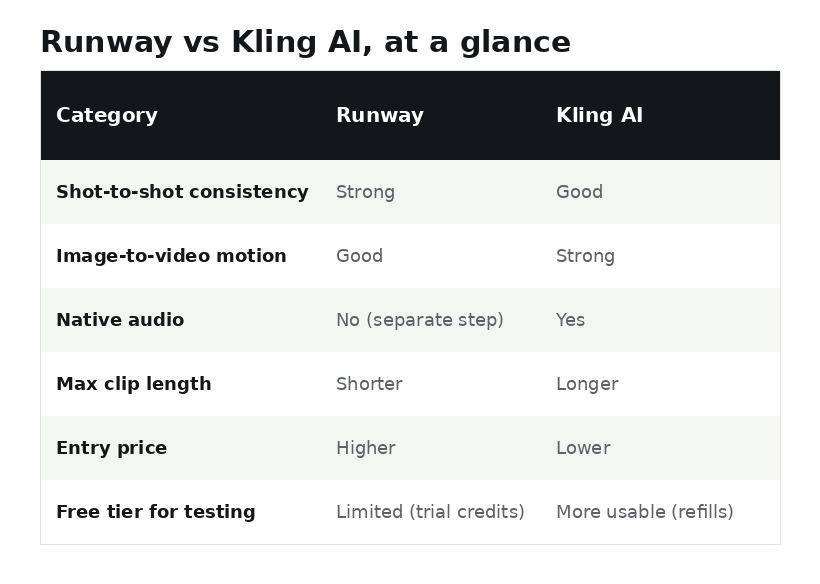
- Consistency across shots. Runway is built around keeping characters and objects coherent across multiple cuts — a real strength for anything resembling a scene rather than a single isolated clip.
- Benchmark quality. On independent text-to-video quality benchmarks, Runway's current flagship model has consistently ranked at or near the top of the field.
- A broader creative toolset. Runway offers a wider suite of editing tools beyond raw generation, useful if you want to stay inside one platform for more of the post-production process.
- Performance transfer. Runway's tools for transferring a performance or gesture onto an AI-generated character are currently ahead of what Kling offers in that specific area.
Where Kling AI wins
- Motion realism, especially from a single image. Kling has a genuine edge in turning a still image into video with convincing weight and physical motion.
- Native audio. Kling's newer models can generate synced sound effects and ambient audio alongside video, where Runway currently requires a separate audio step.
- Longer clips. Kling supports meaningfully longer generated clips than Runway's per-generation limit, useful for anything beyond a short isolated shot.
- Price and free-tier usability. Kling's entry pricing is lower, and its free tier is generally considered more usable over time thanks to replenishing credits, versus a one-time trial allotment.
A simple way to decide
- Choose Runway if: you're working on complex, multi-shot scenes where character and object consistency matters, you want the highest benchmark-quality output, or you're already using Runway's broader editing suite.
- Choose Kling if: you want strong quality at a noticeably lower price, you're animating from still images specifically, you need native audio without an extra step, or you want a free tier that's actually usable for ongoing experimentation.
| Scenario | Better pick | Why |
|---|---|---|
| Short-form social clip from one photo | Kling | Stronger image-to-video motion, lower cost per clip |
| Multi-shot brand or ad film | Runway | Character/object consistency across cuts matters more here |
| Need synced sound effects, fast | Kling | Native audio generation, no separate step |
| Testing the category on a tight budget | Kling | Lower entry price and a free tier that stays usable longer |
Where this fits into a real content workflow
Neither tool replaces planning and editing — both are generation engines, not full production pipelines. If your actual bottleneck is coming up with ideas and scripts rather than the video generation itself, that's a different problem; see our piece on the wider wave of AI content-creation apps for tools aimed more at that end of the workflow.
Frequently asked questions
Do I have to choose only one of these tools?
No — a common professional approach is using both together, generating consistent reference images in one and animating them in the other. There's no rule requiring an exclusive choice.
Are Runway and Kling AI free to try?
Both offer free tiers, though the generosity and structure of the free credits differs between them and changes over time — check each platform's current pricing page directly before assuming a specific limit.
Which one is better for a beginner just experimenting?
Kling's free tier is generally considered friendlier for extended experimentation due to replenishing credits, making it a reasonable low-risk starting point if you're not sure yet which tool fits your work.